PIVlab – free (stereo) particle image velocimetry software
PIVlab is free and open-source particle image velocimetry (PIV) software, and currently the most frequently cited PIV tool on the market. It analyses particle images and videos from any camera – from a smartphone or action camera to a scientific high-speed camera – calculates the velocity distribution, and derives, displays and exports many parameters of the flow. The graphical user interface makes PIV analyses fast and easy, also for beginners.
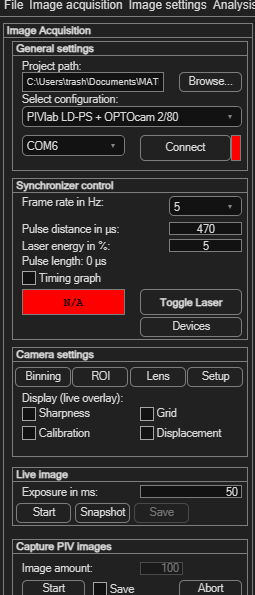
When your lab grows, PIVlab grows with it: together with OPTOLUTION's lasers, cameras and synchronizers, PIVlab also records the images itself, synchronized with the laser – and with two cameras even stereo-PIV.
Get PIVlab
New to PIVlab? Start with the installation guide and the quickstart tutorial, or browse the user manual.
Why use PIVlab?
Simple
Thanks to the graphical interface, PIV analyses are very simple:
Quality
PIVlab uses state-of-the-art algorithms for cross-correlation and optical flow:
Complete
Start with the images you already have, from any camera. When you add a PIV system from OPTOLUTION, PIVlab becomes more than analysis software: one program takes you from the camera to the result:
- Control OPTOLUTION's lasers, synchronizers and cameras – developed together with PIVlab, so everything works hand in hand.
- Record the image pairs, synchronized with the laser.
- Create printable calibration boards.
- Calibrate, analyse, validate and export.
No separate acquisition software, no copying files between programs. See Camera setup and Capturing images in the manual.
Expandable
Start with standard 2D PIV in minutes. When you need the velocity through the light sheet as well, add a second camera: PIVlab records both cameras synchronized, creates the calibration board and measures all three velocity components (stereo-PIV), with the same workflow. You can even try it before buying anything, with the built-in stereo-PIV simulator. Available from PIVlab 4.0.
Learn more about stereo-PIV in PIVlab
Trusted
Thousands of researchers trust the results of PIVlab:

Based on a customized Google Scholar search. See also the monthly updated PIV software usage statistics.
Frequently asked questions
Can I analyse images from my own camera?
Yes. PIVlab analyses image series and videos from any camera, for example a smartphone, an action camera or a scientific camera. No special hardware is needed to get started. See the quickstart tutorial.
Can PIVlab record images directly from a camera?
Yes, as soon as you add PIV hardware: together with an OPTOLUTION synchronizer and laser, PIVlab records PIV image pairs directly from supported cameras (OPTOcam, pco, OPTRONIS, Chronos), synchronized with the laser pulses. See Camera setup.
Does PIVlab support stereo-PIV?
Yes, from PIVlab 4.0. With two cameras PIVlab measures all three velocity components in the light sheet: it records both cameras synchronized, creates the calibration board, calibrates and analyses, all in one program. See Stereo-PIV.
How do I get a calibration target?
PIVlab creates printable ChArUco calibration boards in the size you need. With a stereo set from OPTOLUTION, a calibration target is included.
Can I try stereo-PIV without buying hardware?
Yes. The built-in 3D flow and stereo-PIV simulator creates realistic images of two virtual cameras, including calibration boards, so you can go through the complete stereo-PIV workflow.
Do I need MATLAB?
No. The standalone app for Windows needs no MATLAB licence. PIVlab is also available as a MATLAB toolbox and in the web browser with MATLAB Online.
Is PIVlab free?
Yes. PIVlab is free, open-source software under the MIT licence.
How to cite PIVlab
Thielicke, W. and Sonntag, R. (2021) Particle Image Velocimetry for MATLAB: Accuracy and enhanced algorithms in PIVlab. Journal of Open Research Software, 9: 12. DOI: 10.5334/jors.334. More publications are listed under References.